
SWF Video Converter3.0 - Download
You'll be able to download in few seconds.
Publisher Description
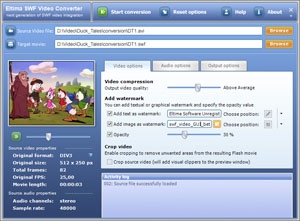
SWF Video Converter is a powerful utility, which was developed to convert any movie file into compressed SWF video and FLV streaming video formats. The program supports almost all popular file extensions such as AVI, MPEG, WMV, ASF and 3GP as well as other available codecs (over 300 identifiable codecs).Conversion of a movie into Macromedia Flash format creates file-ready SWFs for the Web or for streaming across Internet connections. It is an excellent way to share video files with people over the world not worrying whether they have correct codec installed or what operating system they are using. SWF Video Converter transcodes almost any video into SWF file format (legacy Flash 3+, latest Macromedia MX 8 or FLV). The program offers several useful options to select. You may customize Flash movie quality, add audio/video controls (start/stop/pause/etc.) to resulting Flash file, apply custom text and/or image watermarks to copyright your files, specify watermarks opacity and position as well as create HTML page with embedded SWF movie. Advanced options allow you to crop movie screen in order to emphasize certain objects or remove unwanted areas from the resulting Flash movie such as markers or subtitles, replace original sound with your own (WAV or MP3), adjust sampling and bitrates and save original soundtrack into separate file (MP3). SWF Video Converter uses DirectShow technology to render movies. Activity logs and On-screen movie preview make the conversion process easy and hassle-free. You may find SWF Video Converter very useful while redistributering the movies encoded by proprietary hardware-based codecs (some digital camcorders and capture tools are shipped with them). Convert Video AVI files directly into Flash SWF file! There is no need to run any special programs or plugins to create SWF video file, simply select and convert Video to SWF Flash file!
About SWF Video Converter
This Converters & Optimizers program is available in English. It was last updated on 29 September, 2026. SWF Video Converter is compatible with the following operating systems: Windows.
The company that develops SWF Video Converter is ELTIMA Software GmbH. The latest version released by its developer is 3.0.
The download we have available for SWF Video Converter has a file size of 3.1 MB. Just click the green Download button above to start the downloading process. The program is listed on our website since 2006-05-15 and was downloaded 0 times. We have already checked if the download link is safe, however for your own protection we recommend that you scan the downloaded software with your antivirus. Your antivirus may detect the SWF Video Converter as malware if the download link is broken.
How to install SWF Video Converter on your Windows device:
- Click on the Download button on our website. This will start the download from the website of the developer.
- Once the SWF Video Converter is downloaded click on it to start the setup process (assuming you are on a desktop computer).
- When the installation is finished you should be able to see and run the program.
Program Details
System requirements
Download information
Pricing
Version History
version 3.0
posted on 2006-05-15
Totally new version
Disclaimer
External Download
We do not host SWF Video Converter on our servers. We did not scan it for viruses, adware, spyware or other type of malware. This app is hosted by the software publisher and passed their terms and conditions to be listed there. We recommend caution when installing it.
The external download link for SWF Video Converter is provided to you by apps112.com without any warranties, representations or guarantees of any kind, so access it at your own risk.
If you have questions regarding this particular app contact the publisher directly. For questions about the functionalities of apps112.com contact us.
